The Additional  command
contains various markings that are often used in technical drawings e.g.
different variants of reference lines, position numbering symbols and universal
markings that gather values from drawing objects.
command
contains various markings that are often used in technical drawings e.g.
different variants of reference lines, position numbering symbols and universal
markings that gather values from drawing objects.
Functionality and the
detailed way of handling the command are described in the
Symbols and markings
chapter.
Numbering symbols allow to number objects and to gather
parameters from them (e.g. name, type etc.). In this way it is possible to
quickly number many objects and place the require texts in the drawing.
CADprofi program automatically detects numbered
objects in the drawing, thanks to which in the dialog window the first available
number  from the specific
branch (e.g. ME - mechanical) is being displayed. The
from the specific
branch (e.g. ME - mechanical) is being displayed. The  button allows to select the next highest
number
button allows to select the next highest
number
By adding different number prefixes, user can create many
numbered sequences (e.g. one sequence without prefixes 1, 2, 3…., and second P1, P2, P3).
Inserting symbols with the Insert
multiple option will cause the symbols to have numbers added to them with
increased numeration.
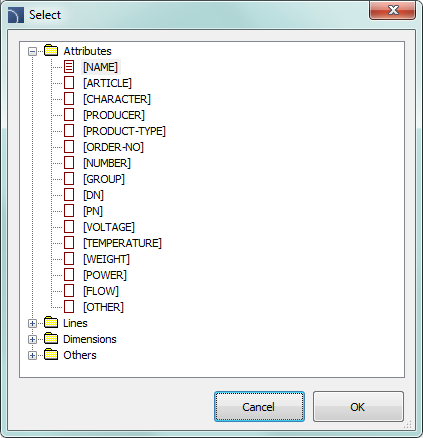
The Mark 1, Mark 2 fields allow to add in the selected symbol any
text or information retrieved from the indicated object. Selecting the
information type will be possible after pressing the  button that is located next to the
field.
button that is located next to the
field.
In the newly opened window user can select the following
information:
• Attributes - indicated object attributes
values.
• Lines - line type or installation kind.
• Dimensions - dimensions retrieved from the
indicated object.
• Others - for example the CAD program system
variable values.